Communicating with Customers
Vantage includes multiple ways of communicating with you customers directly from the Customer Manager panel.
Using SMS
For the basics of how to use SMS messaging, including how to top up your SMS credit balance, please see the Sending SMS Messages article.
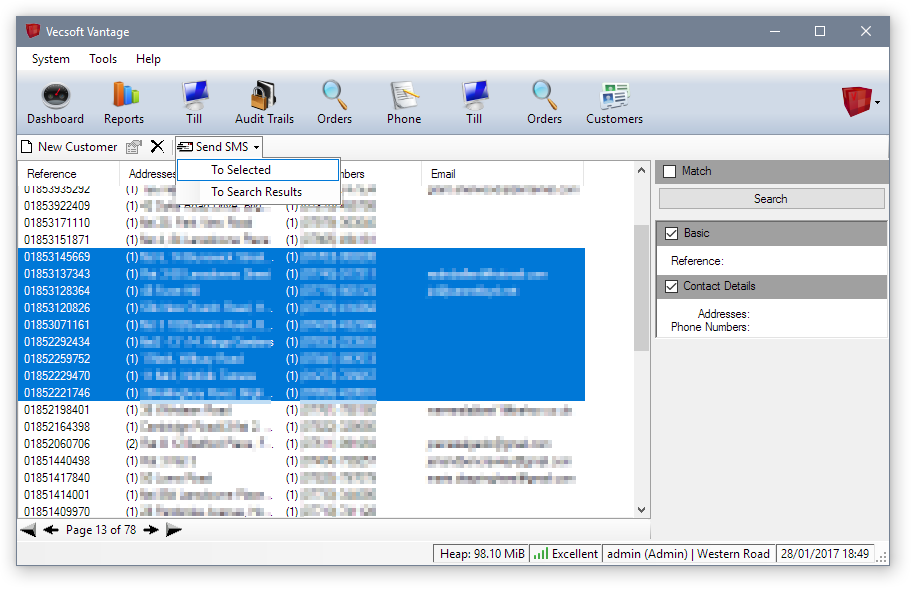
Once you have a SMS credit balance, you can use this to send messages directly to your customers by selecting one or more customers, then using the 'Send SMS' drop-down menu on the toolbar of the Customers panel:
The standard SMS message window will appear, with a special entry in the recipients pane showing 'Customer Manager Results', along with the number of valid, unique mobile numbers that were extracted from the customers.
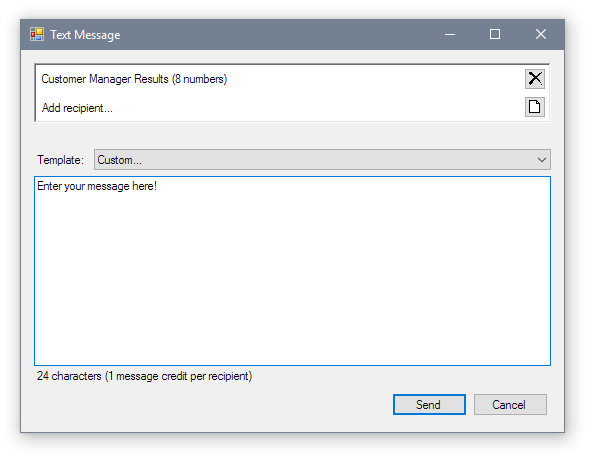
Clicking 'Send' will send the entered message to all the valid, unique mobile numbers that could be extracted from the selected customers. Please note you will need a sufficient SMS credit balance for the number of recipients.
Reaching many customers
If you need to send a batch message to a large subset, or all, of your customers, you can use the other option under the 'Send SMS' menu, labeled 'To Search Results'. This will attempt to extract valid, unique mobile numbers from all customers that match your current search criteria. If you have no criteria selected, this will be your entire customer database.
Please be aware, sending a message to a large number of customers will consume a large number of SMS credits - always check before sending!