Exporting Customer Data
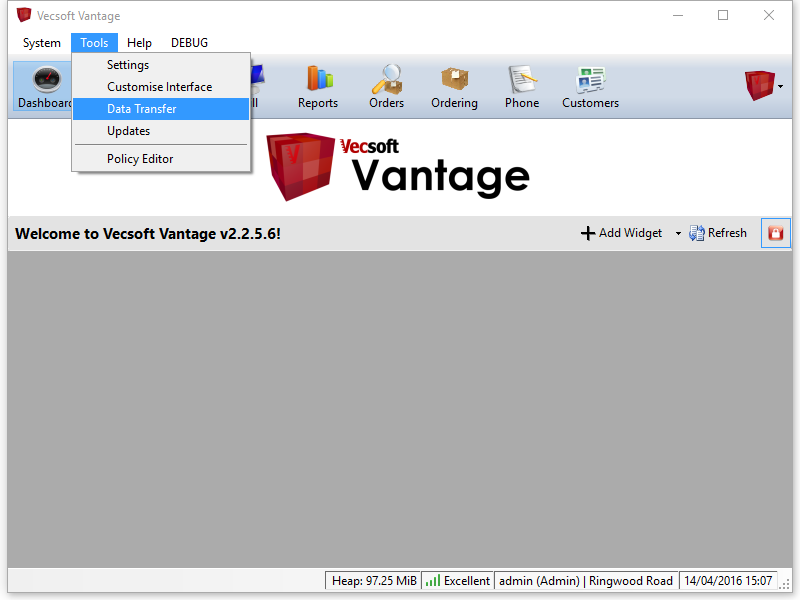
Your customer database can be exported to other formats for use in external programs and services. To begin, choose the Data Transfer Wizard from the Tools menu:
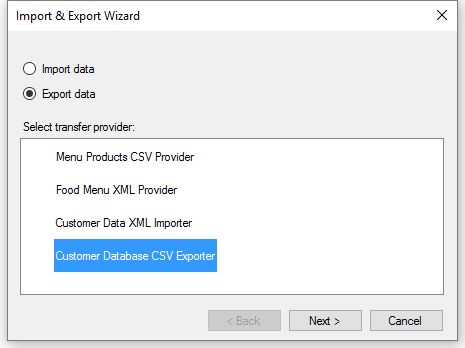
This will present you with a list of all the types of data that Vantage can import and export. Make sure Export is selected, then choose the Customer Database CSV Exporter item in the list:
Finally, you will see a window with two lists, one full and one empty. The items in the left list represent all the individual pieces of data that can be stored about a customer.
Find the information you would like to export, and move them over to the right-hand list by highlighting them and clicking the right arrow. The items should be added in the order you want them to appear in the file.
Click the button labeled File at the top of this window, and choose a location and file name for the exported data.
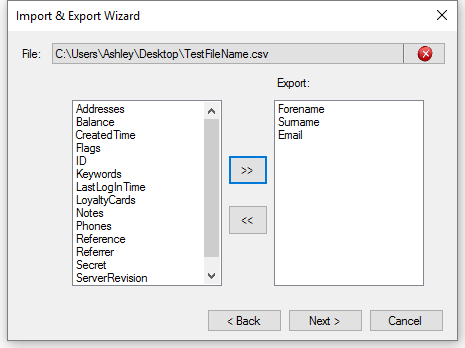
Click Next to proceed with the export. After the progress bar fills to 100%, your file will be ready for opening in another program, such as Excel.